File Encryption Decryption Secure Free Tool Pdf, Media, Zips
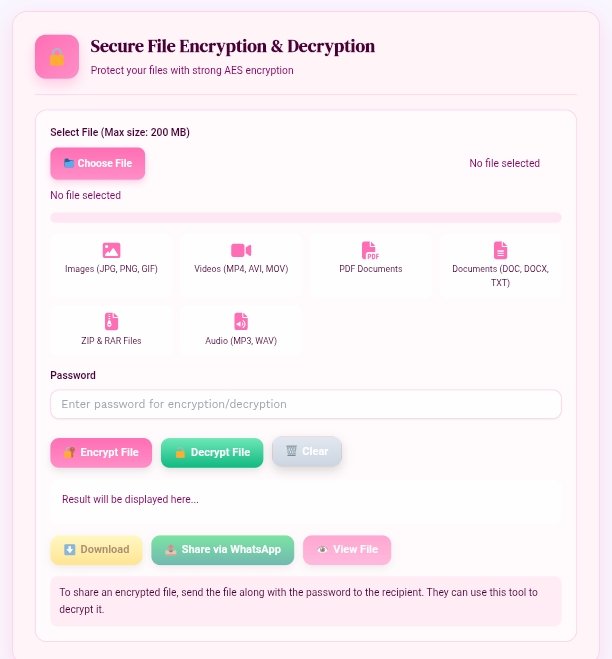
Secure File Encryption & Decryption
Protect your files with strong AES encryption
How to Use
- Click on the “Choose File” button and upload your file (Images, Videos, PDF, Docs, ZIP, or Audio).
- Enter a strong password in the password box for encryption or decryption.
- Click Encrypt File to lock your data securely.
- To unlock, upload the encrypted file, enter the same password, and press Decrypt File.
- Your file will be ready in seconds – download, view, or share it directly.
File Encryption Decryption Secure Free Tool Pdf, Media, Zips
Using a file encryption and decryption tool is simple and fast. You don’t need technical expertise or coding skills. Follow these steps:
- Visit the Tool Page: Open a trusted File Encryption Decryption Secure Free Tool Pdf, Media, Zips on your browser.
- Upload Your File: Click on “Choose File” or “Select File” and upload your document, image, audio, ZIP, or PDF.
- Select the Desired Action: Choose “Encrypt” to lock your file or “Decrypt” to unlock it.
- Set a Password or Encryption Key: (Optional but recommended) Add a password for additional security.
- Process the File: Click on “Start” or “Encrypt Now.” Within seconds, your file will be securely processed.
- Download the Result: Save the encrypted or decrypted version to your device instantly.
The best part — these tools often work entirely online, without saving your files to external servers. That means your documents stay private and secure.
Secret chat incrypt 🔏 Decrept easy to use free tool click here
Best Practices for File Security and Privacy
If you frequently share files online, follow these best practices for maximum protection:
- Always use HTTPS tools: Ensure the URL of your tool starts with “https://” for secure communication.
- Avoid sharing passwords via email: Use separate messaging apps or password managers to share encryption keys.
- Use strong passwords: Combine uppercase, lowercase, numbers, and special symbols for maximum strength.
- Delete files after processing: Don’t leave decrypted files open or stored in public folders.
- Regularly update your security knowledge: Learn about new encryption technologies and online threats.
By following these steps, you can make the most of a File Encryption Decryption Secure Free Tool Pdf, Media, Zips safely and confidently.
Common Encryption Mistakes to Avoid
Even though file encryption is easy, users sometimes make small mistakes that can reduce security. Here are a few to avoid:
- Using Weak Passwords: Simple passwords like “12345” or “password” are easy to crack.
- Forgetting the Decryption Key: Always save or remember your key safely. Losing it means losing access to your files.
- Uploading to Untrusted Sites: Use only verified encryption tools with clear privacy policies.
- Ignoring File Types: Not all formats encrypt equally; always double-check file compatibility.
- Overlooking Backup: Before encrypting, make sure to keep an original copy just in case.
By avoiding these errors, you ensure that your data stays fully protected and easily accessible when needed.
Advanced Security Tips for Professionals
If you’re a business owner, content creator, or IT professional, take your encryption strategy further:
- Batch Encryption: Use tools that allow encrypting multiple files at once for faster workflow.
- End-to-End Encryption: Choose tools that guarantee your files are encrypted before leaving your device.
- Offline Encryption Mode: Some advanced tools offer downloadable versions for offline file protection.
- Use Two-Factor Authentication: Combine encryption with multi-factor login systems for added defense.
- Monitor Encryption Logs: Keep track of file encryption history to maintain compliance and data integrity.
A File Encryption Decryption Secure Free Tool Pdf, Media, Zips can help professionals manage sensitive client data securely without heavy software.
Top FAQs About File Encryption and Decryption Tools
1. What is the purpose of a File Encryption Decryption Secure Free Tool Pdf, Media, Zips?
It helps users secure their files by converting them into unreadable code and later restoring them with the correct password or key.
2. Can I encrypt any type of file using this tool?
Yes. Most tools support multiple file types including PDFs, ZIP archives, images, videos, and documents.
3. Is online file encryption safe?
Yes, as long as you use a trusted website with HTTPS and no file storage policy. The encryption process happens locally in your browser.
4. What encryption method is best?
AES-256 is considered the most secure and widely trusted encryption algorithm used by professionals and organizations.
5. Do I need to install software for encryption?
No. You can use browser-based tools that work instantly without downloads or installations.
6. What happens if I lose my encryption password?
Unfortunately, encrypted files cannot be recovered without the correct password or key. Always store it securely.
7. Is this tool free to use for all file types?
Yes, the File Encryption Decryption Secure Free Tool Pdf, Media, Zips is designed for free public use and supports multiple formats.
8. Can I use this tool on my phone or tablet?
Absolutely. Most tools are mobile-friendly and work on Android, iOS, and desktop browsers.
9. Will file quality be affected after encryption or decryption?
No. Encryption does not alter file quality, size, or format—it only changes access permission.
10. Is it legal to use encryption tools?
Yes. File encryption is 100% legal and encouraged for data protection, as long as it’s not used for illegal content.
Conclusion
Data security is no longer optional — it’s essential. Whether you’re protecting your business contracts, confidential documents, or personal media, encryption keeps your information safe from hackers, leaks, and misuse.
A File Encryption Decryption Secure Free Tool Pdf, Media, Zips offers a fast, free, and efficient way to secure your files without technical complexity. With simple upload-and-click functionality, users can easily encrypt PDFs, ZIPs, and media files instantly.
As technology evolves, file safety should always remain a top priority. By using trusted encryption tools, creating strong passwords, and following security best practices, you can confidently store and share your data online.
If you’re looking for a free, secure, and professional tool, this type of file encryption and decryption platform is the best way to ensure privacy, safety, and peace of mind in the digital world.
File Encryption Decryption Secure Free Tool Pdf, Media, Zips
Introduction
In today’s digital world, protecting your files and data is more important than ever. Whether it’s a personal PDF, a confidential ZIP archive, or important media files, keeping them secure ensures privacy and safety. A File Encryption Decryption Secure Free Tool Pdf, Media, Zips allows users to protect their files with strong encryption algorithms, making it nearly impossible for unauthorized users to access them.
With cyber threats increasing every day, file security has become a necessity for individuals, students, and professionals alike. Free online encryption and decryption tools help users secure files instantly without installing heavy software or paying subscription fees. This article explains everything you need to know about file encryption, its benefits, and how a secure free tool can help protect your sensitive data.
What Is File Encryption and Decryption?
File encryption is the process of converting readable data (plaintext) into unreadable code (ciphertext) using an encryption key. This ensures that only authorized users who have the decryption key can access the original file.
Decryption, on the other hand, is the process of reversing encryption—turning the ciphertext back into readable data. The combination of encryption and decryption ensures that your information remains private and inaccessible to hackers or unauthorized users.
A File Encryption Decryption Secure Free Tool Pdf, Media, Zips provides both features in one interface, helping users encrypt and decrypt files in just a few clicks.
Why File Encryption Matters in 2025
With remote work, cloud storage, and data sharing becoming everyday habits, the risk of data leaks has increased. Files shared online often pass through multiple servers, and if not encrypted, they can be intercepted easily. Encryption adds a powerful layer of security that ensures even if your files are stolen, they remain unreadable.
Furthermore, modern encryption tools are built with advanced algorithms like AES-256 and RSA, which are trusted by cybersecurity experts and organizations worldwide. A File Encryption Decryption Secure Free Tool Pdf, Media, Zips helps everyone—from content creators to corporate employees—keep sensitive information private.
How a Secure Free Encryption Tool Works
A secure encryption and decryption tool works in three simple steps:
- Upload Your File: Choose the file you want to encrypt or decrypt. This can be a PDF, image, audio file, ZIP, or document.
- Apply Encryption or Decryption: Click on the desired action (Encrypt or Decrypt). The tool uses an algorithm to convert your file into encrypted code or revert it back to normal.
- Download the File: Once processed, download your secure file. Some tools allow you to add a password for extra protection.
Modern free encryption tools are designed to work online without storing user files on servers. This ensures privacy and data confidentiality.
Key Features of a File Encryption Decryption Secure Free Tool Pdf, Media, Zips
A professional encryption tool offers the following features:
- Multiple File Format Support: Encrypt and decrypt PDFs, media files, ZIPs, and documents.
- Free and Easy to Use: No installation or registration required; works directly in your browser.
- Strong Security Algorithms: Utilizes AES, DES, or RSA encryption for maximum protection.
- Cross-Platform Access: Works on Windows, macOS, Android, and iOS browsers.
- Instant File Processing: Encrypts or decrypts within seconds without compromising file quality.
- No Data Storage: Ensures files are automatically deleted from servers after processing.
- Password Protection: Option to add your own key or password for better control.
A File Encryption Decryption Secure Free Tool Pdf, Media, Zips combines simplicity with advanced technology, making file protection accessible to everyone.
Benefits of Using a Secure Free Tool
1. Protects Personal and Professional Data
Encryption prevents unauthorized access to sensitive information like ID documents, contracts, and financial records.
2. Ensures Privacy for Media Files
Creators can protect photos, videos, and audio files before sharing them online or storing them in the cloud.
3. Safe Cloud Storage
Encrypted files can be uploaded to Google Drive, Dropbox, or OneDrive securely. Even if breached, the data remains unreadable.
4. Free Access with No Sign-Up
Users can encrypt and decrypt files instantly without any software downloads or hidden fees.
5. Compatibility with All File Types
From ZIP archives to text documents and PDFs, everything can be processed in one place.
Why Choose an Online Encryption Tool Over Software
Offline encryption software often requires installation, updates, and technical knowledge. An online tool, however, works instantly in your browser and doesn’t consume storage space.
Try to use other website
How to Use a File Encryption Decryption Secure Free Tool Pdf, Media, Zips
Using a file encryption and decryption tool is simple and fast. You don’t need technical expertise or coding skills. Follow these steps:
- Visit the Tool Page: Open a trusted File Encryption Decryption Secure Free Tool Pdf, Media, Zips on your browser.
- Upload Your File: Click on “Choose File” or “Select File” and upload your document, image, audio, ZIP, or PDF.
- Select the Desired Action: Choose “Encrypt” to lock your file or “Decrypt” to unlock it.
- Set a Password or Encryption Key: (Optional but recommended) Add a password for additional security.
- Process the File: Click on “Start” or “Encrypt Now.” Within seconds, your file will be securely processed.
- Download the Result: Save the encrypted or decrypted version to your device instantly.
The best part — these tools often work entirely online, without saving your files to external servers. That means your documents stay private and secure.
Best Practices for File Security and Privacy
If you frequently share files online, follow these best practices for maximum protection:
- Always use HTTPS tools: Ensure the URL of your tool starts with “https://” for secure communication.
- Avoid sharing passwords via email: Use separate messaging apps or password managers to share encryption keys.
- Use strong passwords: Combine uppercase, lowercase, numbers, and special symbols for maximum strength.
- Delete files after processing: Don’t leave decrypted files open or stored in public folders.
- Regularly update your security knowledge: Learn about new encryption technologies and online threats.
By following these steps, you can make the most of a File Encryption Decryption Secure Free Tool Pdf, Media, Zips safely and confidently.
Common Encryption Mistakes to Avoid
Even though file encryption is easy, users sometimes make small mistakes that can reduce security. Here are a few to avoid:
- Using Weak Passwords: Simple passwords like “12345” or “password” are easy to crack.
- Forgetting the Decryption Key: Always save or remember your key safely. Losing it means losing access to your files.
- Uploading to Untrusted Sites: Use only verified encryption tools with clear privacy policies.
- Ignoring File Types: Not all formats encrypt equally; always double-check file compatibility.
- Overlooking Backup: Before encrypting, make sure to keep an original copy just in case.
By avoiding these errors, you ensure that your data stays fully protected and easily accessible when needed.
Advanced Security Tips for Professionals
If you’re a business owner, content creator, or IT professional, take your encryption strategy further:
- Batch Encryption: Use tools that allow encrypting multiple files at once for faster workflow.
- End-to-End Encryption: Choose tools that guarantee your files are encrypted before leaving your device.
- Offline Encryption Mode: Some advanced tools offer downloadable versions for offline file protection.
- Use Two-Factor Authentication: Combine encryption with multi-factor login systems for added defense.
- Monitor Encryption Logs: Keep track of file encryption history to maintain compliance and data integrity.
A File Encryption Decryption Secure Free Tool Pdf, Media, Zips can help professionals manage sensitive client data securely without heavy software.
Top FAQs About File Encryption and Decryption Tools
1. What is the purpose of a File Encryption Decryption Secure Free Tool Pdf, Media, Zips?
It helps users secure their files by converting them into unreadable code and later restoring them with the correct password or key.
2. Can I encrypt any type of file using this tool?
Yes. Most tools support multiple file types including PDFs, ZIP archives, images, videos, and documents.
3. Is online file encryption safe?
Yes, as long as you use a trusted website with HTTPS and no file storage policy. The encryption process happens locally in your browser.
4. What encryption method is best?
AES-256 is considered the most secure and widely trusted encryption algorithm used by professionals and organizations.
5. Do I need to install software for encryption?
No. You can use browser-based tools that work instantly without downloads or installations.
6. What happens if I lose my encryption password?
Unfortunately, encrypted files cannot be recovered without the correct password or key. Always store it securely.
7. Is this tool free to use for all file types?
Yes, the File Encryption Decryption Secure Free Tool Pdf, Media, Zips is designed for free public use and supports multiple formats.
8. Can I use this tool on my phone or tablet?
Absolutely. Most tools are mobile-friendly and work on Android, iOS, and desktop browsers.
9. Will file quality be affected after encryption or decryption?
No. Encryption does not alter file quality, size, or format—it only changes access permission.
10. Is it legal to use encryption tools?
Yes. File encryption is 100% legal and encouraged for data protection, as long as it’s not used for illegal content.
Conclusion
Data security is no longer optional — it’s essential. Whether you’re protecting your business contracts, confidential documents, or personal media, encryption keeps your information safe from hackers, leaks, and misuse.
A File Encryption Decryption Secure Free Tool Pdf, Media, Zips offers a fast, free, and efficient way to secure your files without technical complexity. With simple upload-and-click functionality, users can easily encrypt PDFs, ZIPs, and media files instantly.
As technology evolves, file safety should always remain a top priority. By using trusted encryption tools, creating strong passwords, and following security best practices, you can confidently store and share your data online.
If you’re looking for a free, secure, and professional tool, this type of file encryption and decryption platform is the best way to ensure privacy, safety, and peace of mind in the digital world.